Chapter 5.2 – How Large Language Models Are Trained (High Level)
A practical, non-academic look at how large language models are trained — and why that training shapes how they behave in real-world usage.
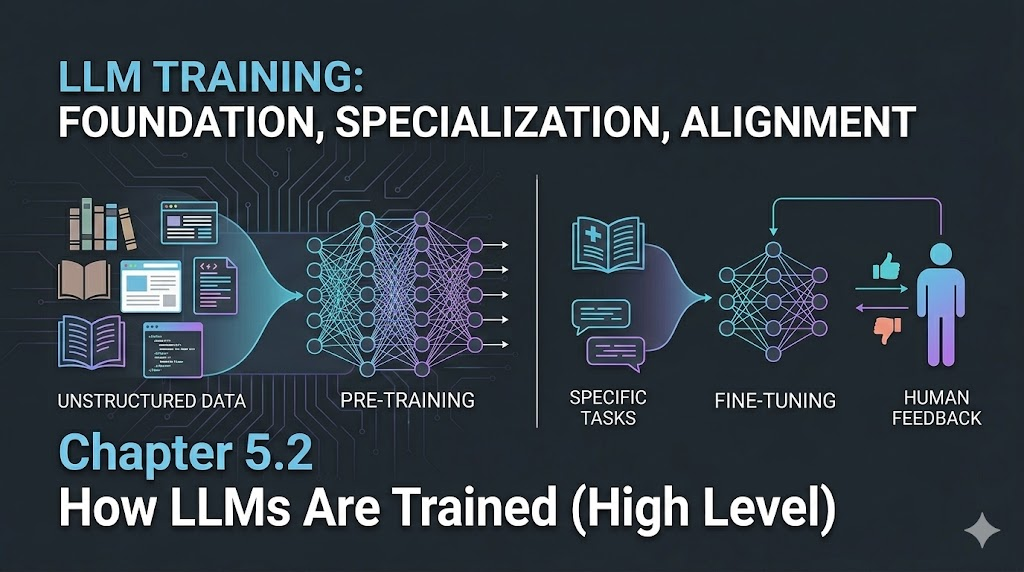
How Large Language Models Are Trained (High Level)
When I first started using LLMs seriously, I didn’t care how they were trained.
They worked — mostly — and that was enough.
But after a while, patterns started showing up:
- Sometimes they were confident and wrong
- Sometimes they hedged when they didn’t need to
- Sometimes they refused reasonable requests
- Sometimes they hallucinated details that sounded real
At first, this felt random.
Later, I realized: this behavior isn’t random — it’s shaped directly by how these models are trained.
Not just what data they see, but how they’re optimized and what they’re rewarded for.
That’s what this chapter is about — not the math, not the academic theory — but the training pipeline that turns raw text into something that feels conversational.
Aha! Moment:
The quirks and surprises in LLM behavior aren’t random—they’re a direct result of how these models are trained and rewarded.
The Big Picture First
At a high level, training an LLM happens in three major stages:
- Pre-training – Learn language patterns from massive text corpora
- Fine-tuning – Adapt behavior for specific tasks or domains
- Alignment (RLHF) – Teach the model how to respond helpfully, safely, and usefully
Each stage shapes how the model behaves in production — and skipping any of them makes the system feel very different to use.
flowchart LR
    Data[Raw Text Data] --> Pretrain[Pre-training]
    Pretrain --> Finetune[Fine-tuning]
    Finetune --> Align[Alignment / RLHF]
    Align --> Model[Deployed LLM]
    style Data fill:#e3f2fd,stroke:#1976d2,stroke-width:2px
    style Pretrain fill:#fff3e0,stroke:#f57c00,stroke-width:2px
    style Finetune fill:#ede7f6,stroke:#5e35b1,stroke-width:2px
    style Align fill:#e8f5e9,stroke:#388e3c,stroke-width:2px
    style Model fill:#fce4ec,stroke:#ad1457,stroke-width:2px
Engineer’s reflection: Think of this like base AMI → hardened image → org-specific golden image → production rollout.
Let’s walk through each stage in practical terms.
Stage 1 — Pre-training: Learning Language at Scale
Pre-training is where the model learns:
- Grammar
- Sentence structure
- Facts (implicitly)
- How ideas relate across long contexts
The training data usually includes:
- Books
- Websites
- Articles
- Documentation
- Code
- Forums
The objective is simple: Predict the next token.
But doing this across trillions of tokens forces the model to learn surprisingly deep patterns — including reasoning-like behavior, summarization, translation, and explanation — even though none of those tasks were explicitly programmed.
This is where most of the compute and cost lives.
Infra analogy: Like training a base OS image by installing every major library and runtime — heavy, expensive, but reusable everywhere.
After pre-training, the model:
- Knows language very well
- Can generate fluent text
- But isn’t particularly helpful yet
It can ramble, contradict itself, ignore instructions, or behave oddly in conversations.
That’s where the next stages matter.
Stage 2 — Fine-tuning: Shaping Task Behavior
Fine-tuning takes the pre-trained model and exposes it to smaller, curated datasets focused on specific behaviors, such as:
- Answering questions
- Writing code
- Following instructions
- Summarizing text
- Maintaining tone
Instead of raw internet-scale data, this stage uses:
- Prompt–response pairs
- Domain-specific examples
- Task-oriented datasets
This doesn’t teach the model new language — it teaches it how to use what it already knows in structured ways.
Engineer’s reflection: Pre-training teaches syntax. Fine-tuning teaches workflows.
Without fine-tuning, you’d get a model that speaks well but collaborates poorly.
Stage 3 — Alignment: Teaching the Model How to Behave
Even after fine-tuning, models can:
- Give unsafe advice
- Produce biased outputs
- Be overly verbose
- Ignore user intent
- Sound rude or unhelpful
Alignment training — often using RLHF (Reinforcement Learning from Human Feedback) — tries to correct this.
The rough flow looks like:
flowchart LR
    Prompt[User Prompt] --> LLM1[Model Responses]
    LLM1 --> Human[Human Ranking]
    Human --> Reward[Reward Model]
    Reward --> Train[Model Optimization]
    Train --> Improved[Aligned LLM]
    style Prompt fill:#e3f2fd,stroke:#1976d2,stroke-width:2px
    style LLM1 fill:#fff3e0,stroke:#f57c00,stroke-width:2px
    style Human fill:#ede7f6,stroke:#5e35b1,stroke-width:2px
    style Reward fill:#e8f5e9,stroke:#388e3c,stroke-width:2px
    style Improved fill:#fce4ec,stroke:#ad1457,stroke-width:2px
This stage doesn’t improve factual knowledge much — but it massively improves:
- Helpfulness
- Tone
- Instruction-following
- Safety
- Refusal behavior
Engineer’s warning: Alignment doesn’t make the model smarter — it makes it nicer and safer to use.
Why Training Shapes Model Personality
Once you know this pipeline, a lot of LLM behavior makes sense:
- Hallucinations → gaps in training data + confidence bias from pre-training
- Over-cautious refusals → strong alignment rewards for safety
- Verbosity → reward tuning favors helpfulness and completeness
- Polite tone → alignment data heavily biases toward cooperative style
These aren’t bugs — they’re side effects of optimization goals.
Engineer’s reflection: You don’t get “truth machines.” You get “reward-optimized text generators.”
Why Fine-Tuned Models Feel So Different
This also explains why:
- Base models feel raw and weird
- Chat models feel conversational
- Code models feel structured
- Domain models feel specialized
They’re not different architectures — they’re different training trajectories.
Same foundation. Different shaping forces.
Infra analogy: Same Kubernetes cluster, different admission controllers, policies, and workloads — behavior changes without changing the core platform.
What This Means for Practitioners
From an engineering perspective, this training setup implies:
- LLMs don’t reason — they optimize reward functions
- They reflect training data distributions, not reality
- Alignment trades off accuracy for safety and usability
- Fine-tuning biases behavior more than people expect
- Prompting is essentially runtime fine-tuning
This explains why:
- Small prompt changes produce large output differences
- Tone matters as much as content
- Constraints improve results
- Examples outperform instructions
Engineer’s reflection: Prompting is configuration, not querying.
What I Wish I Knew Earlier
Takeaway:
- LLM training happens in layers: pre-training → fine-tuning → alignment
- Pre-training teaches language, not helpfulness
- Fine-tuning teaches structure and task behavior
- Alignment teaches tone, safety, and cooperation
- Most “model personality” comes from alignment, not intelligence
What’s Next?
➡ Series 5 – Chapter 5.3: Tokens, Context Windows, and Why Prompts Matter
In the next chapter, we’ll explore:
- What tokens actually are
- How context windows limit memory
- Why models forget earlier parts of conversations
- How prompt structure impacts output quality
Architectural Question: How can you design prompts and context to get the most reliable, useful output from LLMs—especially as context windows and tokenization limits come into play?
You now understand how LLMs are shaped by their training. Next, we’ll learn how to communicate with them effectively.