6. Final Thoughts
Summary and final thoughts on Terraform Import and Refactoring series.
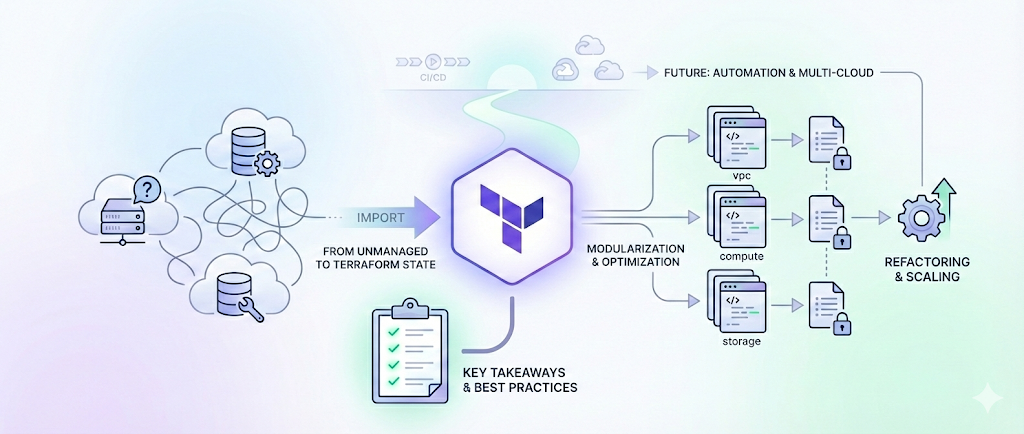
🎯🔍 Final Thoughts and Common Issues in Terraform Import and Refactoring
As we wrap up our Terraform Import and Refactoring series, it’s time to reflect on the key insights shared, and take stock of common pitfalls that often appear during the journey of bringing unmanaged infrastructure into Terraform.
Whether you’re modernizing legacy systems, moving toward a GitOps approach, or consolidating multiple sources of infrastructure truth, this final post offers a comprehensive recap and practical solutions to help you move forward with confidence.
🧠 Key Takeaways from the Series
1. Terraform Import Isn’t a Silver Bullet
Terraform’s import command is incredibly useful, but it’s just the start. It doesn’t generate Terraform configuration files — you must create the matching resources in .tf files, which requires an accurate understanding of existing infrastructure.
use the script provided in the previous post or use terraformer tool to generate the .tf files for existing resources. This script/tools can be a lifesaver, especially when dealing with complex setups.
2. Refactoring: A Must for Scaling
Refactoring Terraform configurations enhances code clarity, improves reusability, and reduces duplication. If you’re still relying on monolithic .tf files, modularization is your ticket to sustainable growth.
📘 Scenario: Splitting a flat .tf file into modules like networking, compute, and storage makes it easier to assign ownership to different teams and reuse components across dev/test/prod.
3. Modularization Best Practices
- Break down resources by service (e.g.,
ec2,rds,s3) or lifecycle stage (e.g.,networking,compute). - Use input variables and outputs to make modules reusable across environments like
dev,test, andprod. - Avoid tight coupling — modules should be as standalone as possible.
📘 Example: Create a vpc_module that takes CIDR blocks and tag inputs, then reuse it across multiple projects with different values.
4. State Management Is Crucial
State is the heart of Terraform. Whether you’re splitting state files, migrating state, or importing resources, use commands like:
terraform state listterraform state mvterraform state rmto avoid drift or duplication.
📘 Tip: Always take a backup of the state file before making manual changes.
5. Tag Smarter, Not Harder
Instead of manually tagging each resource, define locals for common tags and reuse them:
📘 Example:
1
2
3
4
5
6
locals {
  common_tags = {
    Environment = var.environment
    Owner       = "platform-team"
  }
}
🧩 Common Issues & How to Solve Them
Few of the common issues you might encounter while importing and refactoring Terraform configurations are:
🔄 1. Resource Not Recognized After Moving to Module
- Symptom: After modularization, Terraform wants to destroy and recreate resources.
- Cause: State still points to the old resource path.
- Fix:
1
terraform state mv aws_instance.my_instance module.ec2.aws_instance.this
📦 2. Terraform Attempts to Recreate Existing Resources
- Symptom:
terraform planshows new resources instead of recognizing existing ones. - Cause: Resource was not imported into the module path.
- Fix:
1
terraform import module.ec2.aws_instance.this i-0123456789abcdef0
🧱 3. Hardcoded Parameters Everywhere
- Symptom: Configs break across environments.
- Fix: Replace hardcoded values with
variablesandlocals. Useterraform.tfvarsor environment-specific files to inject values.
🏷️ 4. Inconsistent Tagging Between Flat and Modular Code
- Fix: Standardize tag structure using shared locals and document tag strategy (e.g., mandatory
Environment,Application,Owner).
🕸️ 5. Dependency Hell
- Symptom: Modules fail or apply in the wrong order.
- Fix: Leverage
depends_on, but more importantly, pass output values from one module to another to create implicit relationships.
🌐 6. Environment Config Conflicts
- Scenario: You’re importing EC2 instances, but subnet or VPC IDs differ by environment.
- Fix: Parameterize these values and use conditionals or lookup maps in modules.
😵 7. Terraform Plan Shows Unintended Changes
- Root Causes: Incorrect defaults, outdated state, or improper resource matching.
- Fixes:
- Use
terraform refreshorplan -refresh-onlyto re-sync state - Audit
.tfdefinitions to ensure resource attributes match real infrastructure
- Use
🚀 Real-World Scenario: Importing a Legacy EC2 Setup
Imagine your team has a running EC2 instance created manually via AWS Console, hosting a critical internal app. You need to bring it under Terraform control without downtime.
Steps:
- Create a minimal EC2 resource definition that mirrors the existing setup.
- Use
terraform importto map the instance:1
terraform import aws_instance.legacy_web i-0ab12345cdef6789
- Run
terraform planand verify no changes are needed. - Refactor into a module:
module "web" { source = "./modules/ec2" } - Move the state:
1
terraform state mv aws_instance.legacy_web module.web.aws_instance.this
This approach avoids disruptions and allows you to gradually bring resources into a Git-managed infrastructure codebase.
📌 Final Thoughts: Making the Most of Terraform
The transition from manually managed infrastructure to a fully automated and codified environment isn’t without its hurdles. But with careful planning, consistent patterns, and the lessons from this series, you can:
- Avoid common pitfalls
- Improve team collaboration
- Create resilient and repeatable infrastructure code
Key Reminders:
- Always start small: Import one resource at a time.
- Maintain backups: Keep backups of your state files before refactoring.
- Use modules and variables thoughtfully: Simplify and standardize your configurations.
- Document your changes: Ensure better traceability and team alignment.
Refactoring isn’t a one-time task—it’s an ongoing effort to improve the health and structure of your Infrastructure as Code (IaC). Terraform provides powerful tools, but success lies in how thoughtfully you apply them.
🌱 What’s Next?
This wraps up our Terraform Import and Refactoring blog series. We hope it has empowered you to:
- Confidently manage existing infrastructure
- Design more modular Terraform architectures
- Troubleshoot state and refactoring issues effectively
If this series helped clarify your Terraform journey, share it with your team or IaC community. Stay tuned for upcoming series on IAC CI/CD pipelines, Module registries, and Multi-cloud provisioning patterns.
Have feedback or questions? Drop me a message or connect on LinkedIn.
Catch you later, code Ninjas! Happy Codifying! ⚙️💻🚀