5. Code Refactoring Part 2
Advanced refactoring techniques for Terraform code after import.
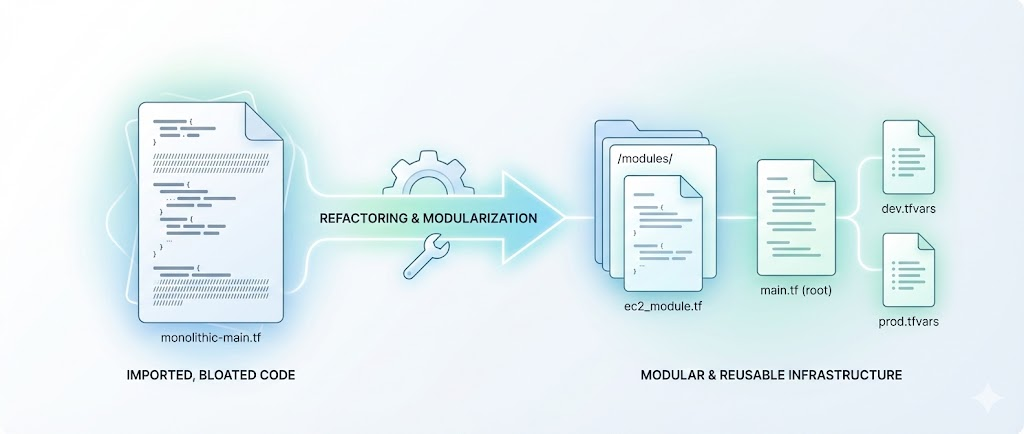
♻️ Code Refactoring: Enhancing Terraform Configurations (Part 2)
In the previous post, Code Refactoring: Why It Matters, we discussed the importance of refactoring Terraform code for scalability and maintainability. We identified key challenges in the current setup and outlined the goals of refactoring.
In this post, we will continue our journey into refactoring Terraform code, focusing on practical steps to enhance the configurations and improve the overall infrastructure management process.
1. Analysis of Current Codebase 🔍
Let’s say the current codebase for one of the ABC Corp application CodifyMe environments is structured as follows:
They follow a practice where each application environment has its own repository. The repository is named after the application and environment, in this case, codifyme-prod-aws-repo. The repository contains multiple .tf files, each defining resources for different components of the application. For example, for each EC2 instance, there is a separate .tf file.
The repository is organized as follows:
1
2
3
4
5
6
7
codifyme-prod-aws
├─ backend.tf
├─ codifyme-postgres-cluster.tf
├─ s3.tf
├─ loadbalancer.tf
├─ variables.tf
├─ outputs.tf
As you may remember from our previous post, organization ABC Corp has been using DevOps and IaC for their infrastructure for quite some time. However, they have not yet fully embraced the concept of reusable modules due to manually created resources. CodifyMe is one of the applications that has a few components that are not yet fully modularized, like their front-end web servers codifyme-web-1 and codifyme-web-2. The current codebase for the web servers is as follows:
Previously, we learned and imported the following resources:
1
2
codifyme-web-1.tf
codifyme-web-2.tf
Now, the new codebase for the CodifyMe application is as follows:
1
2
3
4
5
6
7
8
codifyme-prod-aws
├─ backend.tf
├─ codifyme-postgres-cluster.tf
├─ s3.tf
├─ loadbalancer.tf
├─ codifyme-web-1.tf  # recently imported
├─ codifyme-web-2.tf  # recently imported
├─ variables.tf
Snippet of the codifyme-web-1.tf file is as follows:
1
2
3
4
5
6
7
8
9
10
11
12
13
14
15
16
17
18
19
20
21
22
23
24
25
26
resource "aws_instance" "codifyme-web-1" {
  ami           = "ami-12345678"
  instance_type = "t2.micro"
  subnet_id     = aws_subnet.codifyme_subnet.id
  vpc_security_group_ids = [aws_security_group.codifyme_sg.id]

  tags = {
    Name = "codifyme-web-1"
  }
}

resource "aws_ebs_volume" "codifyme-web-1-ebs" {
  availability_zone = aws_instance.codifyme-web-1.availability_zone
  size              = 8
  type              = "gp2"
  tags = {
    Name = "codifyme-web-1-ebs"
  }
}

resource "aws_volume_attachment" "codifyme-web-1-ebs-attachment" {
  device_name = "/dev/sdh"
  volume_id   = aws_ebs_volume.codifyme-web-1-ebs.id
  instance_id = aws_instance.codifyme-web-1.id
  force       = true
}
Areas of Improvement 🛠️
- Hardcoded Values: The AMI ID and instance type are hardcoded, making it difficult to change them across environments.
- Code Duplication: The same resource definitions are repeated for
codifyme-web-2, leading to inconsistencies and maintenance challenges. - Lack of Modularity: The resources are defined directly in the root module, making it hard to reuse them across different environments or applications.
- Pipeline Integration Issues: The current setup does not fully integrate with CI/CD pipelines, requiring manual interventions for deployments.
- No Documentation: The codebase lacks proper documentation, making it challenging for new team members to understand the infrastructure setup.
- No Testing: The codebase lacks automated testing, making it difficult to ensure that changes do not break existing functionality.
2. Creating Reusable Modules 🧩
To address the identified challenges, we will create reusable modules for the codifyme-web resources. This will allow us to define the resources once and reuse them across different environments.
For this example, the codebase for the reusable module is available at the following GitHub repository:
https://github.com/ravijoshi1810/module-terraform-aws-ec2.git
1
2
3
4
5
6
7
8
9
10
11
12
13
14
15
16
17
18
19
20
21
22
23
24
25
26
27
28
29
30
31
32
33
34
35
36
37
38
39
40
41
42
43
44
45
46
47
48
49
50
51
52
53
54
55
56
57
58
59
60
61
62
63
64
65
66
67
68
69
70
71
72
73
// Add locals for tags
locals {
  // Locals for EC2 and EBS common tags
  ec2_ebs_common_tags = {
    Name            = "ec2-instance"
    environment     = "Dev"
    applicationname = "Terraform"
    account_id      = "123456789012"
    owner_email     = "rj@example.com"
  }

  ec2_specific_tags = {
    os-version = "RHEL 9.1"
    serverrole = "others"
  }

  // Final EC2 tags
  ec2_tags = merge(local.ec2_ebs_common_tags, local.ec2_specific_tags)

  // Final EBS tags
  ebs_tags = local.ec2_ebs_common_tags
}

module "aws_instance_example" {
  instance_type           = "t2.micro"
  # Rest of the configuration
  source     = "./module/terraform-aws-ec2" # Add private registry path if using Terraform private module registry
  depends_on = []

  # Global or Account Details
  account_id = "123456789012"
  region     = "eu-west-1"

  # Instance Details
  ami_owner               = "123456789012"
  hostname                = "example-instance"
  iam_role                = "AmazonEC2RoleforSSM"
  instance_type           = "t2.micro"
  operating_system        = "RHEL 9"
  user_data_runtime_creds = can(regex("(?i)windows", local.ec2_specific_tags["os-version"])) ? var.akv_local_user_aws_window_vm : var.akv_local_user_aws_linux_vm

  # Network Configuration
  security_groups = ["sg_app"]
  subnet_name     = "PrivateSubnet"
  vpc_name        = "VPC"

  # Volume Configuration
  kms_key_id         = "arn:aws:kms:eu-west-1:123456789012:key/example-key"
  root_vol_size      = 10
  root_vol_type      = "gp2"
  sec_vol_mount_name = ["/app1", "/app2"]
  sec_vol_name       = ["xvde", "xvdf", "xvdg"]
  sec_vol_size       = [3, 4, 5]
  sec_vol_type       = ["gp3", "io1", "gp3"]
  sec_iops_value     = [null, 100, null]
  sec_vol_name_decom = [] # Use only if you want to decommission the volume

  # Tags
  tags     = local.ec2_tags
  tags_ebs = local.ebs_tags

  # Load Balancer Configuration
  enable_loadbalancer_attachment = false
}

# Template Outputs
output "OUTPUT_example_IP" {
  value = module.aws_instance_example.private_ip
}

output "OUTPUT_example_ACCOUNT" {
  value = module.aws_instance_example.account_name
}
📝 Conclusion
- In this post, we have learned how to refactor Terraform code and use reusable modules. We also explored how to move the state of resources to the module using the
movedblock. This approach helps manage resources more efficiently and avoids code duplication. - In the next post, Final Thoughts and Common Issues, we will summarize the entire series and provide solutions to common issues you may face while using Terraform for import and refactoring.
Catch you later, code Ninjas! Happy Codifying! ⚙️💻🚀