Streamlining Application Infra Deployment: Implementation & Tooling
A practical, enterprise-grade guide to building Infrastructure as Code platforms — covering repo structures, pipelines, tooling, and design decisions that actually scale.
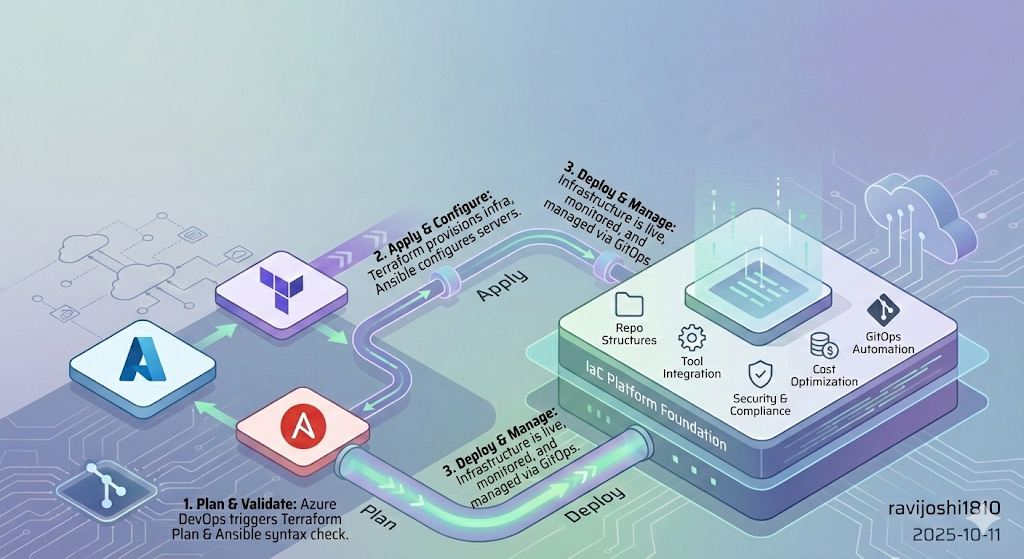
What You’ll Learn
- How to build a real IaC platform foundation, not just scripts
- How tools actually fit together in enterprise delivery
- Repo structures that scale across teams and clouds
- Naming conventions that enable automation
- Hard-earned lessons from real platform rollouts
1. From Principles to Practice
In Part 1, we talked about why DevOps and IaC matter. This part is where theory meets production.
This is where:
- Diagrams become repositories
- Patterns collide with permissions
- “Best practices” meet auditors, outages, and scale
Most IaC failures I’ve seen weren’t caused by bad tools — they were caused by weak foundations:
- No ownership boundaries
- No consistent structure
- No automation contract
- No governance model
This chapter is about building something that survives:
- Multiple teams
- Multiple clouds
- Multiple years
By the end, you’ll be able to:
- Design a real IaC platform structure
- Connect repos, pipelines, and automation
- Avoid the common traps: drift, fragility, tribal knowledge
2. Implementation Approach
This isn’t about building pipelines. It’s about building a platform.
A platform that:
- App teams can consume without understanding Terraform internals
- Security teams can govern without blocking delivery
- Platform teams can evolve without breaking workloads
Below is the real-world structure I’ve used in regulated, multi-cloud environments — including the tradeoffs, design reasoning, and failure patterns that shaped it.
2.1 IaC Repo Setup
Goal: Establish a single source of truth for infrastructure — with explicit promotion, auditability, and rollback safety.
- Create a dedicated Git repository for IaC
- Branching strategy:
main→ productiondevelop→ integrationfeature/*→ experiments
In highly regulated orgs, we sometimes replaced branches with folders + approvals — the key is explicit promotion, not Git ideology.
Why this exists: Without a clear promotion model, teams deploy straight to prod — and the first rollback becomes tribal knowledge instead of version control.
Takeaway: Your repo structure is your first governance control. Treat it like architecture, not hygiene.
2.2 DevOps Tool Integration
Goal: Build a reliable execution spine — without overengineering upfront.
Azure DevOps pipelines→ orchestrationTerraform CLI→ provisioning -Ansible CLI→ configuration
Terraform = what
Ansible = how
Pipelines = when
Why this separation matters:
Mixing provisioning and configuration in the same layer creates rollback ambiguity and state confusion. Keeping them separate gives you clearer failure domains.
Takeaway: Start with a minimal, composable toolchain. Add complexity only when scale forces it.
2.3 Repo Structure
Goal: Make your repository structure enforce correctness — even before pipelines run.
Reusable logic→ modules/rolesDesired state→ root modules/playbooksExecution logic→ pipelines
Structure is silent governance. When done right, teams do the right thing without realizing it.
Why this matters: At scale, humans stop reading docs — they follow patterns. Your repo layout becomes your most powerful policy engine.
Takeaway: A clean separation of concerns prevents platform collapse under growth.
2.4 Security & Compliance
Goal: Bake security into pipelines — don’t bolt it on after incidents.
- Secret scanners:
CredScan,GitLeaks - Terraform linting and static analysis
- Pipeline failures on violations
Why this works: Post-provisioning audits catch issues after damage. Pipeline-time enforcement prevents them from ever existing.
Takeaway: Security should feel automatic, not bureaucratic.
2.5 Cost Optimization
Goal: Make cost visible before infrastructure exists.
Infracostduring PRs- Cost comparison between design options
- Early signal on expensive patterns
Cost feedback during design changes behavior more than finance governance ever will.
Why this works: Developers optimize what they see. If cost appears only in monthly reports, it’s already too late.
Takeaway: Move cost signals left — into the developer workflow.
2.6 GitOps Automation
Goal: Make Git the single source of truth and trigger for everything.
- Git
webhookstrigger pipelines - Pipelines infer intent from repo structure
- Environments converge to declared state
GitOps = Git as control plane, pipelines as actuators, infra as desired state.
We’ll go deep into execution in Part 3.
Takeaway: GitOps isn’t a tool — it’s a contract between humans and automation.
2.7 Policy Enforcement
Goal: Scale governance without scaling friction.
Sentinel/ OPA policies- Mandatory pipeline gates
- Guardrails: regions, SKUs, encryption, tags, networking
Good policy guides teams. Bad policy blocks them.
Why this matters: Manual approvals don’t scale. Automated guardrails do — and they create faster delivery when designed well.
Takeaway: The best governance systems are invisible until violated.
2.8 Docs & Training
Goal: Treat onboarding and documentation as first-class platform features.
- Clear onboarding paths
- Copy/paste starter examples
- Troubleshooting playbooks
Docs are part of your product surface — not a support artifact.
Why this matters: If engineers can’t self-serve, your platform becomes a bottleneck instead of an accelerator.
Takeaway: Great platforms teach users how to succeed without meetings.
2.9 Iterate & Improve
Goal: Build learning loops into your platform lifecycle.
- Feedback from app teams
- Pipeline telemetry
- Backlog grooming
Platform success = continuous convergence to simplicity.
Takeaway: The best platforms never stop evolving — they stabilize while improving.
3. Tool Choices
Skip trends. Build a small, composable toolchain where every tool has a single job and pipelines glue them together.
Recommended Tools
- Azure DevOps Server: Used for CI/CD pipelining.
- Azure DevOps Dedicated Build Agent Server: For pipeline execution and installing dependent services such as Docker, Terraform CLI, and webhook listener service and scripts for GitOps.
- Azure Repo or equivalent: Utilized for Version Control System (VCS).
- Terraform and Ansible CLI (Open Source): This project uses the Azure DevOps extension for Terraform tasks for infrastructure automation. Azure Pipelines Terraform Extension
- CredScan: For scanning and identifying leaks. CredScan Extension
- Megalinter or equivalent SAST tool: Used for Tfscan and Tflint to ensure Terraform code quality. Megalinter Installation
- Infracost: For cost estimation of the infrastructure. Infracost Extension
- Azure Subscription Storage Blob or equivalent: For state management.
- Azure Subscription or equivalent: For deploying the application.
flowchart LR
    Dev[Developer Commit]
    Repo[Application Repo]
    Webhook[Webhook Trigger]
    Pipeline[Reusable Pipeline Template]
    Scan[Security & Quality Scans]
    Cost[Cost Estimation]
    Plan[Terraform Plan]
    Apply[Terraform Apply]
    State[Remote State Backend]
    Cloud[Provisioned Infrastructure]

    Dev --> Repo --> Webhook --> Pipeline
    Pipeline --> Scan --> Cost --> Plan --> Apply
    Apply --> State
    Apply --> Cloud
Every tool solves exactly one problem. Pipelines coordinate them. That’s what keeps the system evolvable.
4. Foundation Setup Checklist
Don’t automate on shaky ground. Build the foundation first.
4.1 Azure DevOps Projects
You’ll need:
- An Azure DevOps org (private or public)
- Three projects:
terraform-ansible-core-modules→ Terraform modules + Ansible rolesado-iac-run-pipelines→ Pipeline templates, orchestration logic, webhook processorstfcli-root-modules-workspace-repo→ App-specific Terraform root modules + Ansible configuration
This separation enforces:
- RBAC boundaries
- Ownership clarity
- Independent lifecycle evolution
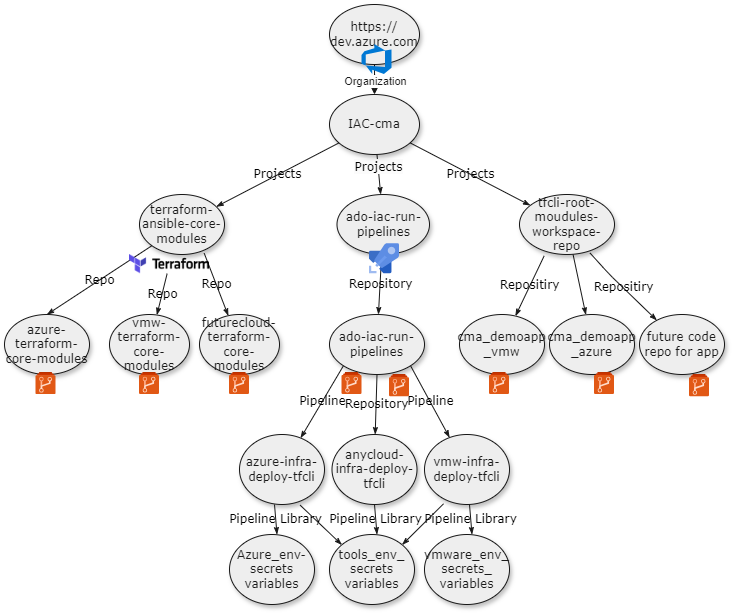
This structure prevents platform teams and app teams from colliding — without slowing delivery.
4.2 Unified Pipeline Templates
Early on, every team wrote its own pipelines. Result: drift, inconsistency, broken standards, and security gaps.
Templates fixed that.
4.2.1 Objective
Establish a unified pipeline structure using Azure DevOps YAML templates.
Outcomes:
- Faster pipeline creation
- Centralized maintenance
- Stronger security
- Consistent deployments
Templates turn CI/CD into a platform capability — not just scripting.
4.2.2 Project Structure
1. Variable Templates Org-wide variables that app teams don’t override.
1
2
3
4
5
# azure-variables.yml
variables:
  azureSubscription: 'MyAzureSubscription'
  resourceGroup: 'MyResourceGroup'
  region: 'East US'
Keep secrets out of templates — use secure variable groups or key vault integration.
2. Step Templates Each template = one atomic task.
Example — Terraform CLI installation:
1
2
3
4
5
6
7
8
9
10
11
parameters:
  - name: terraformVersion
    type: string
    default: '1.5.0'

steps:
  - task: TerraformInstaller@1
    displayName: install terraform
    inputs:
      terraformVersion: $
      allowTelemetryCollection: false
This isolates tooling concerns from pipeline logic — critical for maintainability.
3. Job Templates Cohesive units — validation, build, deploy.
Example — Terraform build and validation job:
1
2
3
4
5
6
7
8
9
10
11
12
13
14
15
16
17
18
19
20
21
22
23
24
25
26
27
28
29
parameters:
  - name: buildSteps
    type: object
    default: []
  - name: applicationName
    type: string
    default: ''

jobs:
  - job: terraform_cli_build_env_job
    dependsOn: ${{ parameters.dependsOn }}
    displayName: Build-TFConfig DryRun
    variables:
      - template: ../variables/terraform_cli_env_config_variables.yml
    steps:
      - ${{ each step in parameters.buildSteps }}:
          - ${{ for key, value in step }}
              ${{ key }}: ${{ value }}
      - template: ../steps/terraform_cli/terraform_install_task.yml
        parameters:
          terraformVersion: ${{ parameters.terraformVersion }}
      - template: ../steps/terraform_cli/terraform_init_task.yml
        parameters:
          serviceName: ${{ parameters.serviceName }}
          environmentName: ${{ parameters.environmentName }}
      - template: ../steps/terraform_cli/terraform_validate_task.yml
        parameters:
          serviceName: ${{ parameters.serviceName }}
          terraformDirectory: ${{ parameters.terraformDirectory }}
Avoid embedding business logic in job templates — keep them orchestration-only.
4. Stage Templates Orchestrate jobs into deployment phases.
Example — CI stage for Terraform validation:
1
2
3
4
5
6
7
8
9
10
11
12
13
14
15
16
17
18
19
20
21
stages:
  - stage: $_$_$_tfBuild
    displayName: $_$_$_tfBuild
    jobs:
      # job to prepare the terraform files for linting and service build.
      # This job will copy the terraform files from core repo and service to a temporary directory on ado agent working
      # directory for linting and service build.
      - template: ../jobs/ado_agent_tf_temp_staging_dir_job.yml
        parameters:
          dependsOn: ''
          buildSteps: $
          tfFilesTempAdoFolder: $(tfFilesTempAdoFolder)
          tfcoreFilesToLint: $(Build.SourcesDirectory)/$/tf-modules/$
          tfServiceFilesToLint: $(Build.SourcesDirectory)/$/$

      # job to run gitleak and credscan on the source repository
      - template: ../jobs/gitleak_credscan_job.yml
        parameters:
          dependsOn: ado_agent_tf_temp_staging_dir_job
          buildSteps: $
          gitleakScanFolder: $(tfFilesTempAdoFolder)
Stages encode execution policy — business intent belongs in application repos.
gitleak_credscan_job.yml
4.2.3 Pipeline Naming Convention
Format: technology_verb_scope.yml
Examples:
- terraform_cli_build_env_stage.yml
- gitleak_credscan_job.yml
- ado_tf_cli_publish_artifacts_job.yml
Bad naming kills usability faster than bad docs.
4.2.4 How to Use Unified Templates
Teams should mostly write zero pipeline YAML — only config and references.
Recommended workflow:
- Understand template boundaries
- Extract repeated logic into templates
- Use job templates for all provisioning flows
- Customize via parameters, not code
- Follow naming conventions
- Reference from central pipeline repo
- Validate in non-prod first
Pipelines should feel boring — and that’s a compliment.
iac_configuration_code → Ansible config (group_vars, host_vars by service/env/host) iac_provisioning_code → Terraform (terraform_templates by service/env)
4.3 IaC Repo Setup
Infra code must scale across:
- Services
- Environments
- Clouds
- Teams
Structure is what enables that scale.
- Core modules/roles → reusable platform building blocks
- Root modules/playbooks → application-specific desired state
4.3.1 Core Modules / Roles
Reusable Terraform modules and Ansible roles — versioned, documented, and stable.
Terraform core module structure:
1
2
3
4
5
6
7
8
tf-modules
└── cloudProviderPrefix-serviceName-type
    ├── readme.md
    ├── main.tf
    ├── provider.tf
    ├── output.tf
    ├── variable.tf
    └── datasource.tf
Cloud provider prefixes:
| Cloud Provider | Prefix |
|---|---|
| Azure | azr |
| VMware | vmw |
| AWS | aws |
| Google Cloud | gcp |
Service naming examples:
| Cloud Service | Type |
|---|---|
| RHEL | vm |
| AKS | cluster |
| Windows | vm |
| Database | vm,cluster |
Example module directory:
1
2
3
4
5
6
7
vmw-rhel-vm/
├── readme.md
├── main.tf
├── provider.tf
├── output.tf
├── variable.tf
└── datasource.tf
Core modules are platform contracts — evolve them slowly.
Ansible Core Role Structure
Roles should behave like APIs — versioned, documented, backward-compatible.
1
2
3
4
5
6
7
8
9
10
11
12
13
14
15
16
17
18
19
20
21
22
23
├── roles
│   └── rhel (serviceType)
│       ├── postgresql_db (roleName)
│       │   ├── tasks
│       │   ├── vars
│       │   ├── default
│       │   ├── templates
│       │   ├── test
│       │   └── handlers
│       ├── nginx_web
│       │   ├── default
│       │   ├── tasks
│       │   ├── templates
│       │   ├── vars
│       │   ├── test
│       │   └── handlers
│       └── flask_app
│           ├── default
│           ├── tasks
│           ├── templates
│           ├── vars
│           └── test
└── inventory (Dynamic Inventory scripts)
Treat roles like APIs: version them, document them, and avoid breaking changes.
4.3.2 Root Modules / Application Repos
Application repositories declare desired state — not reusable logic. Pipelines translate intent into execution.
Naming Patterns
- Terraform:
ServiceName_resources_main.tf - Ansible:
hostname_or_ip-ansible_role_tag_name.yml
These patterns allow webhook automation to infer:
- Which service
- Which host
- Which environment
- Which pipeline template to use
Naming here isn’t cosmetic — automation depends on it.
Base Repository Layout Separate provisioning from configuration — loosely coupled but operationally aligned.
1
2
3
4
5
6
applicationName
├── iac_configuration_code (to host config code)
│   ├── group_vars
│   └── host_vars
└── iac_provisioning_code (to host provisioning code)
    └── terraform_templates
Recommended Terraform Directory Structure
1
2
3
4
5
6
7
8
9
10
11
12
13
14
15
16
17
application_name/
├── environment/
│   ├── production/
│   │   ├── service1-p/
│   │   │   ├── resources_main.tf
│   │   │   └── provider.tf
│   │   ├── service2-p/
│   │   │   ├── resources_main.tf
│   │   │   └── provider.tf
│   └── development/
│       ├── service1-d/
│       │   ├── resources_main.tf
│       │   └── provider.tf
│       ├── service2-d/
│       │   ├── resources_main.tf
│       │   └── provider.tf
│       └── service3/
Example:
1
2
3
4
5
6
7
8
9
10
11
12
13
14
15
16
azure_demoapp/
├── environment/
│   ├── production/
│   │   ├── aks-p/
│   │   │   ├── aks_cluster_resources_main.tf
│   │   │   └── provider.tf
│   │   ├── rhel-p/
│   │   │   ├── rhel_resources_main.tf
│   │   │   └── provider.tf
│   └── development/
│       ├── aks-d/
│       │   ├── aks_cluster_resources_main.tf
│       │   └── provider.tf
│       ├── rhel-d/
│       │   ├── rhel_resources_main.tf
│       │   └── provider.tf
This structure lets automation answer: which app, which service, which environment — just from paths.
Recommended Ansible Directory Structure
1
2
3
4
5
6
7
8
9
10
11
12
13
14
vmw_todo_app (Application name)
├── iac_configuration_code (Ansible config dir)
│   ├── group_vars
│   └── host_vars (variable templates for config mgmt)
│       ├── config_rhel_dev
│       │   ├── 10.1.140.147
│       │   │   ├── 10.1.140.147-nginx_web_deploy.yml
│       │   │   ├── 10.1.140.147-postgresql_db_deploy.yml
│       │   │   └── 10.1.140.148-flask_app_deploy.yml
│       │   └── 10.1.140.148
│       │       └── 10.1.140.148-flask_app_deploy.yml
│       └── config_rhel_prod
│           ├── 10.1.140.180
│           │   └── 10.1.140.180-flask_app_deploy.yml
Decoded Structure
- vmw_tf_todo_app → Application repo root
- iac_configuration_code → Ansible config (group_vars, host_vars by service/env/host)
- iac_provisioning_code → Terraform (terraform_templates by service/env)
This keeps provisioning and configuration loosely coupled — but operationally aligned.
File Naming Rules
- Terraform root modules → must end with
main.tf - Ansible vars →
hostName_or_ip-ansible_role_tag_name.yml
These conventions aren’t stylistic — webhook routing logic depends on them.
Required Variables (Terraform) Terraform root modules must define:
1
2
3
source           = "./azr-rhel-vm"
application_name = "azr_demoapp"
environment      = "prod"
These allow automation to resolve:
- Module source
- Application identity
- Environment workspace
Ansible playbooks only need correct placement — no required variables.
Example Terraform Module — RHEL VM
1
2
3
4
5
6
7
8
9
10
11
12
13
14
15
16
module "az_rhel_demoapp_crq123" {
  source                        = "./azr-rhel-vm"
  application_name              = "azr_demoapp"
  environment                   = "prod"
  service_name                  = "rhel"
  location                      = "eastus2"
  resource_group_name           = "demo-lab-ado-tfe-services"
  linux_virtual_machine_name    = "tfazrdemoapp-rhelVM21"
  linux_virtual_machine_size    = "Standard_B2s"
  os_version                    = "dryice-rhel8-8-image-eastus2"
  subnet_name                   = "PublicSubnet1"
  admin_username                = "adminuser"
  admin_password                = "adminpassword"
  diag_storage_account_name     = "tfedemodiagstoage"
  resource_group_storagediag    = "demo-lab-ado-tfe-services"
}
This file expresses intent only — no pipeline logic, no security, no backend config. Those belong to the platform, not the application repo.
Example Ansible Host Vars — RHEL VM
1
2
3
4
5
6
7
8
# flask_app role vars
app_server_name: "10.1.1.147"
app_directory: "/home/ansible/flask_app"
app_name: "todo_app"
azure_pat: ""
organization: "iac-automation"
project: "tfcli-root-modules-workspace-repo"
build_id: "1689"
These variables let pipelines trace infra → config → deployment → build lineage.
Why These Conventions Matter
This structure:
- ✅ Enables webhook intent inference
- ✅ Keeps pipelines generic
- ✅ Hides platform complexity from app teams
- ✅ Allows platform teams to evolve tooling safely
- ✅ Minimizes drift
- ✅ Makes governance enforceable without meetings
It shifts the question from:
“How do I deploy infrastructure?” to: “What should my application look like?”
What’s Next
In Part 3, we activate this foundation:
- GitOps execution flows
- End-to-end lifecycle automation
- PR vs push models
- Enterprise adoption patterns
👉 Continue to Part 3 — GitOps Execution & Platform Adoption Read Part 3 →