1. Introduction to Terraform Import and Refactoring - Why It Matters
Kickoff to the Terraform Import and Refactoring series: why Day 2 operations matter, challenges, and how Terraform Import bridges the gap.
🛠️ Introduction to Terraform Import and Refactoring - Why It Matters
📜 Overview
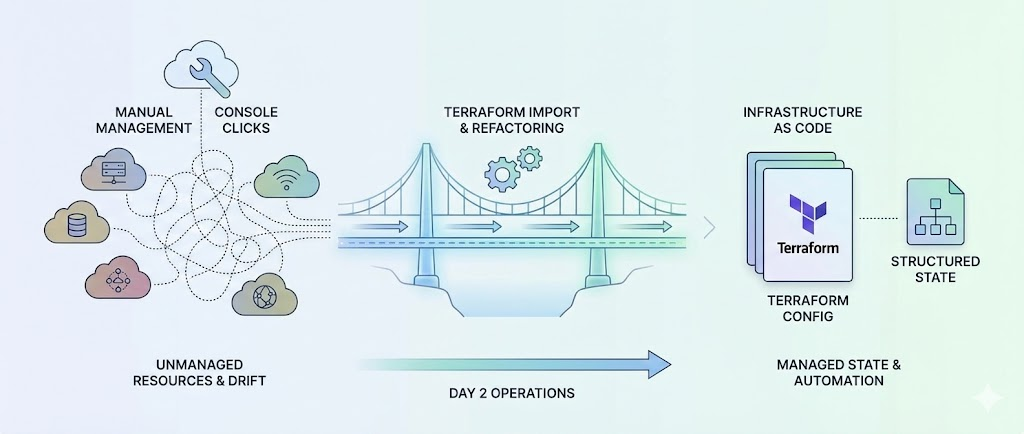
This blog post marks the first in our series about using Terraform Import and Refactoring techniques to bridge the gap between manual infrastructure management and Infrastructure-as-Code (IaC) best practices. We will explore how Terraform Import helps organizations manage Day 2 operations and address real-world challenges, such as configuration drift, brownfield deployments, and the fear of modifying existing infrastructure code.
In the coming posts, we’ll cover step-by-step instructions and practical examples on how to successfully import and refactor Terraform-managed infrastructure, ensuring smoother operations and enhanced scalability.
⚙️ Why Day 2 Operations Matter
While Day 1 provisioning of infrastructure using tools like Terraform is usually straightforward, Day 2 operations—which involve ongoing management, updates, and maintenance of resources—are often fraught with challenges.
Many organizations face difficulties in keeping their infrastructure in sync with their Terraform code, especially when manual operations take over after initial provisioning. This disconnect can lead to configuration drift, inconsistent environments, and costly errors when changes need to be made.
🚧 Real-World Challenges in Day 2 Operations
⚠️ 1. Terraform Used Only for Day 1 Provisioning
In many organizations, Terraform is used exclusively for Day 1 provisioning, with subsequent changes managed manually. This approach creates challenges like:
- Manual Changes: Resources are modified directly through cloud consoles or CLI, bypassing Terraform workflows.
- Drift from IaC: Terraform configurations quickly become out of sync with actual infrastructure, making updates risky.
Example Scenario: An organization has two environments—prod and dev—with Terraform-managed root module repositories tied to dedicated workspaces. While Day 1 provisioning follows GitOps principles, all Day 2 operations, such as scaling or modifying infrastructure, are performed manually. Over time, discrepancies between the live environment and Terraform configurations make it impossible to safely run terraform apply.
🏢 2. Brownfield Deployments and Hybrid Environments
Organizations often inherit existing infrastructure due to migrations, acquisitions, or legacy systems. These “brownfield” resources are not initially IaC-managed, leading to:
- Untracked Resources: Existing infrastructure is not represented in Terraform state or configurations.
- Integration Challenges: Migrating unmanaged resources into Terraform requires careful planning to avoid disruptions.
Example Scenario: During an on-premises to AWS migration, a fleet of EC2 instances and RDS databases is provisioned manually to ensure continuity. Terraform is later adopted for new deployments, but the previously created resources remain unmanaged, causing fragmentation and compliance challenges.
🌪️ 3. Configuration Drift and Stale Workflows
Manual operations introduce drift between the live environment and Terraform’s state or configuration files:
- Stale Terraform State: Resources created or modified manually are missing from Terraform’s view.
- Operational Risks: Running
terraform applymay inadvertently overwrite manual changes or cause resource destruction. - Bloated Codebases: Repositories become cluttered with unused or inaccurate configurations.
Example Scenario: A team adopts Terraform for AWS infrastructure management. Over time, new resources, such as S3 buckets and Lambda functions, are added manually due to time constraints. The stale Terraform repository fails to reflect the true state of the environment, eroding trust in IaC workflows.
🔒 4. Fear of Modifying Terraform Configurations
Teams often hesitate to modify Terraform configurations for fear of:
- Production Outages: Incorrect configurations or state changes causing downtime.
- Complex Codebases: Large and undocumented Terraform repositories intimidating users.
- Unfamiliarity with Terraform: Operations teams defaulting to manual workflows due to limited IaC expertise.
Example Scenario: A production environment contains critical resources, but the Terraform codebase hasn’t been updated in months. The team avoids touching Terraform configurations, relying instead on manual changes, further exacerbating drift and stale state.
✨ How Terraform Import Solves These Challenges
🔄 Managing Manual Changes
- Terraform Import allows teams to bring unmanaged resources into the Terraform state, effectively “reclaiming” them under IaC management.
- This reduces drift and ensures that all resources, whether provisioned manually or by Terraform, are tracked and managed from a central codebase.
🤝 Integrating Brownfield Deployments
- Terraform Import enables teams to import legacy infrastructure and migrate it into their IaC workflows without disruption.
- This is especially useful for transitioning from manual management to Terraform-driven workflows in hybrid or multi-cloud environments.
🧭 Addressing Configuration Drift
- By importing resources that were previously unmanaged, teams can synchronize their Terraform configurations with actual infrastructure.
- Tools like
terraform refreshandterraform planhelp ensure that Terraform’s view of the infrastructure is accurate.
✅ Reducing Risk and Building Confidence
- Terraform Import reduces the risk of introducing errors by allowing teams to manage manual workflows carefully and incrementally, ensuring that existing infrastructure is safely brought under IaC management.
🗺️ Standard Example Workflow: Resolving Drift with Terraform Import
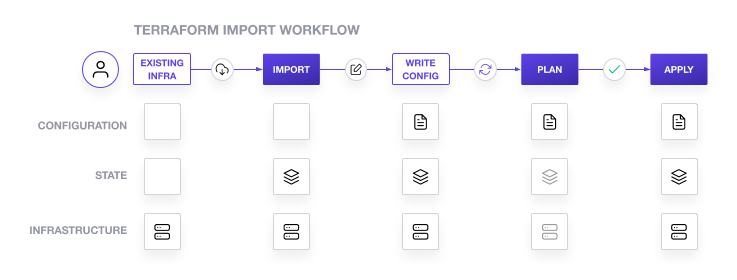
1. 🔍 Identify Drift
1
2
- Inspect live infrastructure (e.g., AWS Management Console, Azure Portal) and compare it with the Terraform state to identify unmanaged or drifted resources.
- Use tools like AWS CLI, Azure CLI, or any custom scripts to list unmanaged resources.
2. 🏗️ Import Resources
1
- Import resources to Terraform state using one of the following approaches:
Using terraform import:
1
2
3
4
5
- Manually add unmanaged resources to the state:
```bash
terraform import aws_instance.example i-0abcd1234efgh5678
```
- Once imported, update the Terraform configuration manually to reflect the resource.
Using Terraform Config-Driven Import:
1
2
3
4
5
6
7
8
9
10
11
12
13
14
15
16
17
- Utilize the `import` block in Terraform configuration to simplify the import process. Add the following block to your `main.tf` file:
```hcl
terraform {
    required_version = ">= 1.5"
}

import {
    to = aws_ec2.bar
    id = "foo"
}
```
- Execute the import process with:
```bash
terraform plan
terraform apply
```
- Terraform will generate the configuration automatically if supported, or provide details to complete it manually.
Using Terraformer:
1
2
3
4
5
- Use [Terraformer](https://github.com/GoogleCloudPlatform/terraformer) to automate the import and configuration generation process:
```bash
terraformer import aws --resources=ec2,s3 --connect=true --profile=default --regions=us-west-2
```
- This tool will generate HCL configurations and state files for specified resources. Review and validate the generated configurations before applying.
3. 🔄 Refresh and Validate
1
2
3
4
5
6
7
8
- Refresh Terraform’s state to align it with the current live infrastructure:
```bash
terraform refresh
```
- Validate the configuration to ensure consistency:
```bash
terraform validate
```
4. ✍️ Update Configurations
1
2
- If using `terraform import`, manually write or update the Terraform configuration file for the imported resource.
- For config-driven imports, ensure the generated or existing configuration matches the desired state.
5. ✅ Reconcile and Apply
1
2
3
4
5
6
7
8
9
- Review the planned changes:
```bash
terraform plan
```
- Apply the configuration to bring the infrastructure under full Terraform management:
```bash
terraform apply
```
- Confirm that the resource is now managed by Terraform without drift.
📊 Summary of Import Methods
| Method | Use Case |
|---|---|
terraform import | Manual and straightforward for individual resources. |
| Config-Driven Import | Simplifies imports and allows automated plan and apply directly in HCL. |
| Terraformer | Ideal for bulk imports and generating HCL configurations for multiple resources. |
🚀 What’s Coming Next in the Series
In the following posts, we will dive deeper into the practical aspects of using Terraform Import to resolve common challenges in Day 2 operations:
Part 2: 🚦 Getting Started with Terraform Import - Step-by-step guide to using terraform import. - Prerequisites and setup. - Common challenges and how to resolve them.
Stay tuned as we continue to explore the power of Terraform Import in managing cloud infrastructure at scale!
📝 Conclusion
In this post, we introduced the key challenges of Day 2 operations and discussed how Terraform Import can help organizations bridge the gap between manual infrastructure management and Infrastructure-as-Code practices. By leveraging Terraform Import, teams can regain control over their infrastructure, reduce risks, and ensure long-term consistency.
For any questions or feedback, feel free to reach out to me. I look forward to hearing your thoughts on this series and how you are using Terraform Import in your own projects!
Catch you later, code Ninjas! Happy Codifying! ⚙️💻🚀